
monday.com Certified Partner · 7 years
monday.com for manufacturing operations
We set up monday.com for manufacturing teams: order intake from your online store, customer drawing approvals, production scheduling across departments, quality control, and dashboards for time, cost, and profit.



The problem
Why manufacturers move production into monday.com
When orders, approvals, and production updates live in email, spreadsheets, and people’s heads, jobs wait in a department and nobody notices until a customer asks.
Orders typed in twice
New orders from your store are copied into another system by hand.
Approvals lost in email
Drawings go back and forth, and nobody is sure which version the customer approved.
Jobs waiting unseen
A job sits in a department for a day because no one updated its status.
Time and profit unknown
You can’t see how long each stage takes, or what each week actually earned.
What we set up
Production scheduling and order tracking in monday.com
Order intake
Shopify, WooCommerce, and eBay orders land on a master board with every detail.
Customer approvals
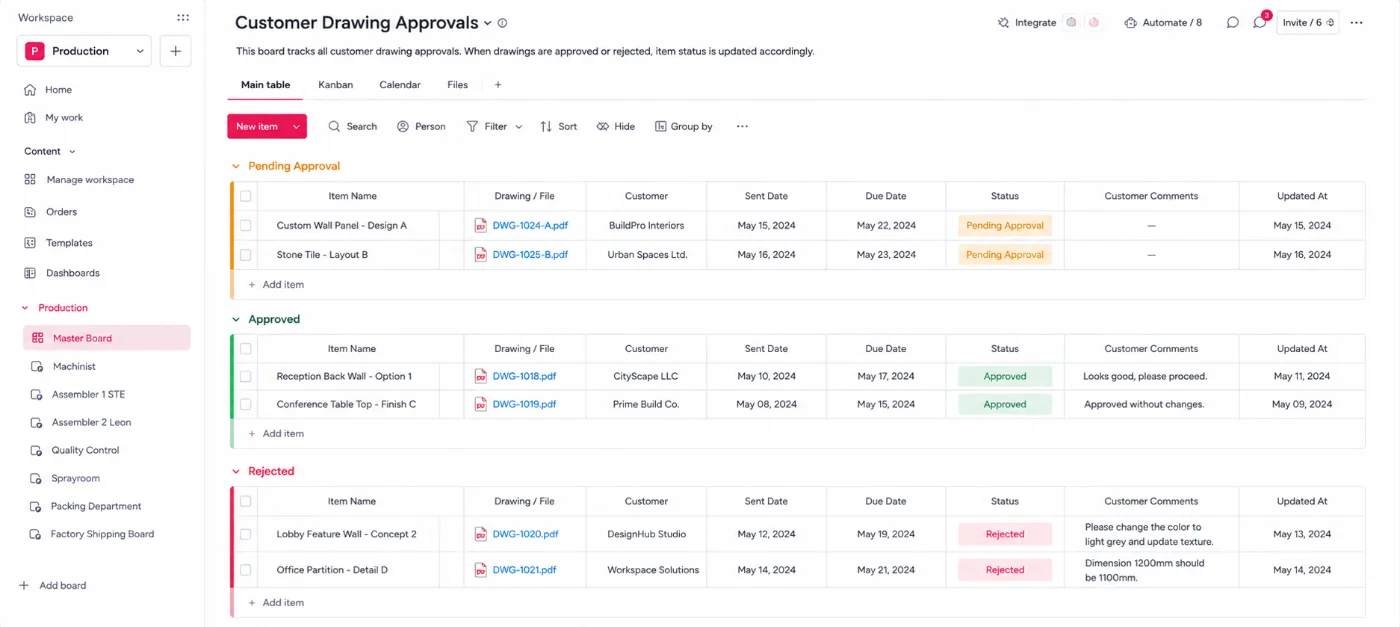
Approval emails with the drawing files and Approve or Reject buttons. Rejections capture the reason.
Department boards
A board for each department, so each team sees only its own queue, in order.
Automatic timers
Moving a job to Working on it starts a timer, and completing it stops the timer.
Quality control
Record who inspected each unit and whether it passed before it moves on.
Packaging and labels
Labels generated for packaging, ready for the shipping team.
Dashboards
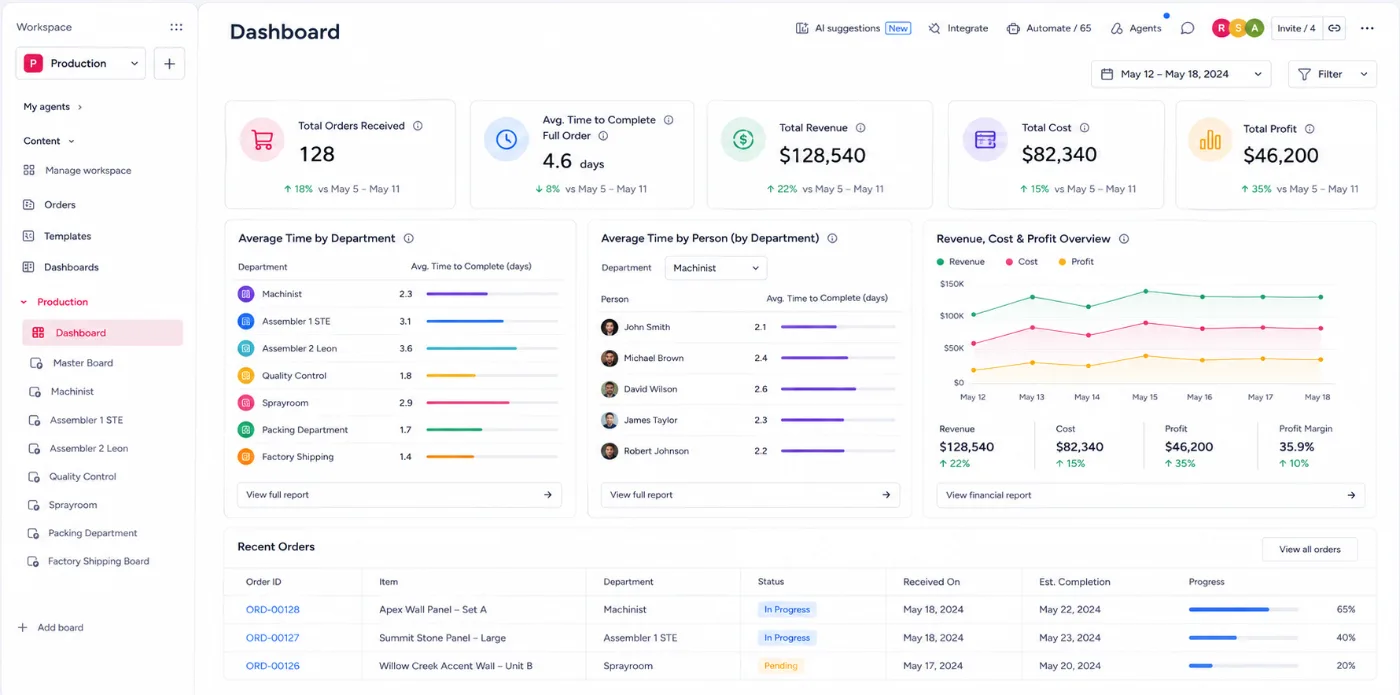
Orders received, average time per order, per department, and per person, plus revenue, cost, and profit.
Customer order lookup
A form on your website: customers enter their order, and an automation replies with its current stage.
Case study · Manufacturing
How Evolution Fires runs production in monday.com

Evolution Fires is a UK manufacturer of premium electric fireplaces and pre-built media walls. About 15 orders a week move through its production departments, each run by a manager with 2–3 team members.
What we built, board by board
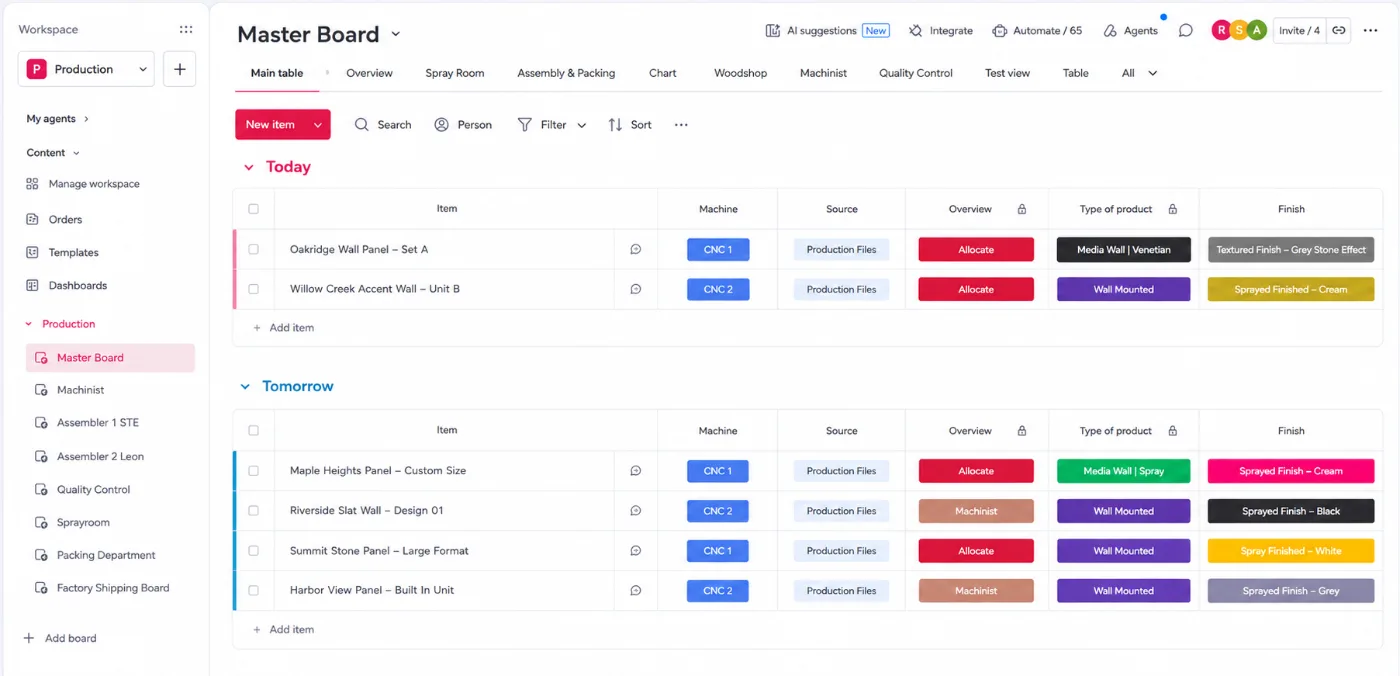
- Master board. New WooCommerce orders land automatically with all their details. The team makes the drawing and sends it to the customer in an approval email with the files and Approve and Reject buttons. Approve, and the item updates itself. Reject, and a monday.com form captures the reason, logs it on the item, and marks the drawing Rejected for revision.
- Machinist board. Approved orders move here and the machinist team is notified. Changing a job to Working on it starts a timer, and completing it stops the timer.
- Assembly board. The same process, with time tracked for every job.
- Quality control board. Records who checked each unit and whether it passed, then sends it to the spray room if needed.
- Spray room and packaging. The same timed process, then labels are generated and the order is packed.
- Master board and dashboard. Each order’s stage updates on the master board automatically, and the dashboard shows orders received, average time per order, per department, and per person, plus revenue, cost, and profit.
- Customer order lookup. A form on the website lets customers ask for an update. An automation finds the order and replies with its current stage.
- Inventory. Every order deducts the components it uses from stock. Low stock triggers a purchase order, which is emailed to the supplier once the team approves it. Barcode scans update stock too. See the inventory setup.
Results
~1 day → 1–2 hrs
Time an order sits in each department, now that every stage is timed and owned
4–5 hrs
Saved every week on moving, chasing, and updating orders
- Fewer missed approvals and fewer lost orders, because every order lands on monday.com
- Another 6 hours a week saved by automating stock deduction, purchase orders, and supplier emails
- Weekly and monthly revenue, cost, and profit, so decisions are faster
- Customers get their order status instantly, without anyone looking it up
Inside the build
What the team works in every day
Screenshots from the real build, with sample data in place of client information.
Connected tools
Connected to the tools you already use
Orders, files, and invoices move between monday.com and your other systems automatically.
- WooCommerce
- Shopify
- eBay
- QuickBooks
- Xero
- Stripe
- Google Drive
- OneDrive
- Gmail
- Outlook
FAQ
monday.com for manufacturing questions
Keep reading
Related guides and services
monday.com automations
Approvals, timers, and stage updates that run on their own.
monday.com integrations
Connect your store, accounting, and file tools.
Inventory management
Stock, reorder points, and purchase orders in monday.com.
monday.com implementation
A full setup, planned and built by a Certified Partner.
Run your production in monday.com
Book a free discovery call. Walk us through how an order moves through your shop, and we’ll show you how it could run in monday.com.